Why 76% of New Google Ads Accounts Fail in the First 90 Days
Most new Google Ads accounts burn through their first $3,000-$5,000 before producing a single qualified lead. The pattern is always the same: broad match keywords with no negatives, a single campaign dumping traffic to the homepage, conversion tracking that fires on page views instead of actual form submissions, and Smart Bidding turned on before the account has any conversion data to learn from.
This guide walks through the exact setup we use at MarketingLeague when launching new accounts - the same structure behind results like 190% sales growth for kGoal and 600% ROAS for London Chess Academy. No theory. Just the steps, in order.
Step 1: Account Structure - Get the Hierarchy Right
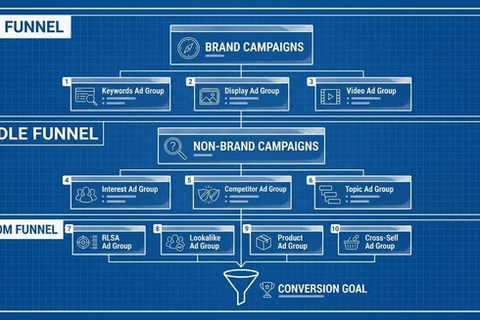
Before you touch a keyword, plan the campaign structure. Bad structure is the #1 reason new accounts waste money - it makes optimization impossible later.
Here's the structure that scales:
| Level | Naming Convention | Example | Purpose |
|---|---|---|---|
| Campaign | [Network]-[Goal]-[Geo] | Search-Leads-US | Budget control, geo targeting |
| Ad Group | [Keyword]-[Match Type] | CRM-Software-Startups-Exact | 1 keyword per ad group, maximum relevance |
| Ads | [Angle]-[CTA Variant] | Pain-Point-FreeTrial-v1 | Testing creative angles |
Rules for new accounts:
- Start with 2-3 campaigns maximum. More campaigns = thinner data per campaign.
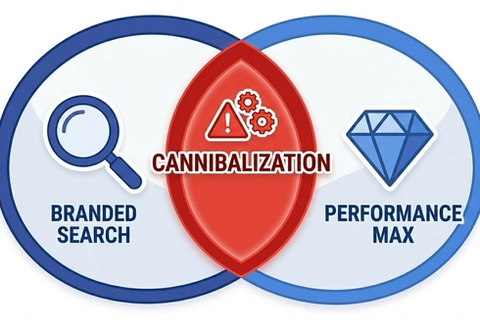
- Separate branded vs non-branded into different campaigns. Always. Branded terms convert at 8-15% while non-branded sits at 1-4%. Mixing them pollutes your data.
- One keyword per ad group for Search. This is non-negotiable. When you stuff multiple keywords in a single ad group, your ad copy can't match every query, your Quality Score drops, and you can't tell which keyword is driving results. One keyword per ad group means your headline matches the search term exactly, your landing page matches the ad, and every optimization decision is clean. 15-25 keywords = 15-25 ad groups.
Step 2: Conversion Tracking - The Part Everyone Rushes
If your conversion tracking is wrong, every optimization decision you make will be wrong. Set this up before launching a single ad.
The most important tracking layer is offline conversions (CRM import). Form submissions and clicks are just proxies - your CRM holds the real data: which clicks turned into actual closed deals and revenue. Everything else in this table exists to support that. Plan for offline conversion import from day one, even if you don't activate it until week 4.
| Tracking Layer | Tool | What It Captures | Priority |
|---|---|---|---|
| Offline conversions | CRM import | Closed deals tied back to click ID (GCLID) | #1 - Most important |
| Primary conversions | Google Ads tag | Form submissions, purchases, calls | Must-have |
| Enhanced conversions | Server-side GTM | Hashed email/phone for match accuracy | Must-have |
| Micro conversions | GA4 events | Scroll depth, video plays, clicks | Nice-to-have |
Critical mistakes to avoid:
- Don't count page views or button clicks as primary conversions. Google's Smart Bidding will optimize for those and deliver junk traffic.
- Set a conversion window that matches your sales cycle. B2B SaaS with a 30-day cycle shouldn't use a 1-day click window.
- Enable auto-tagging (GCLID) from day one. Without GCLID, you can't tie CRM closed deals back to the original click - and offline conversion import becomes impossible.
- Don't optimize based on form fills alone. A keyword producing 20 form fills and 0 closed deals in your CRM is a money pit. Offline conversion data is the only way to know which clicks actually generate revenue.
The difference matters. Accounts with proper server-side tracking see 15-30% more attributed conversions than client-side-only setups, because browser privacy restrictions kill standard cookies.
Step 3: Budget Allocation - How to Split Your First $3,000/Month
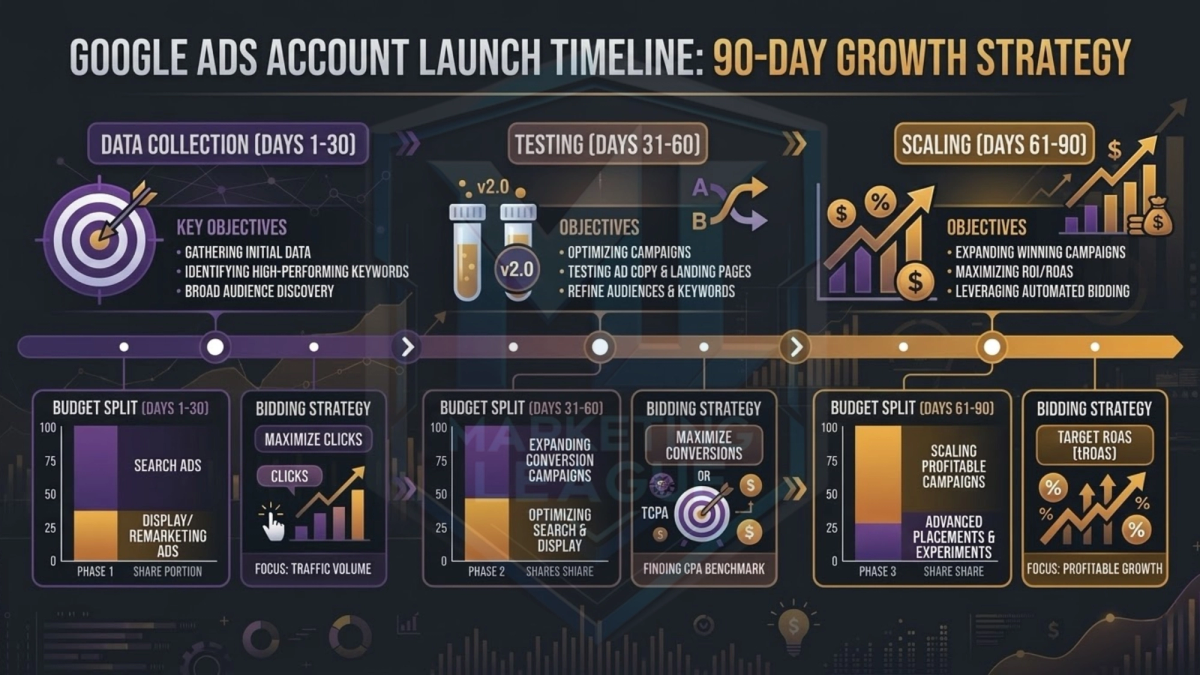
New accounts don't have conversion data, so Smart Bidding has nothing to learn from. Here's how to allocate budget in the first 90 days:
| Phase | Timeline | Budget Split | Bidding Strategy | Goal |
|---|---|---|---|---|
| Phase 1: Data collection | Days 1-30 | 70% Search, 30% branded | Manual CPC | Collect 30+ conversions |
| Phase 2: Testing | Days 31-60 | 60% Search, 20% branded, 20% Display/Discovery | Target CPA (with cap) | Test audiences, validate CPA |
| Phase 3: Scaling | Days 61-90 | 50% Search, 15% branded, 15% Display/Discovery, 20% PMax | Target CPA (with cap) / Target ROAS | Scale winners |
Why manual CPC first: Smart Bidding needs 30-50 conversions in a 30-day window to work properly. Below that threshold, the algorithm makes bad decisions. Manual CPC gives you control while you build that data.
The $3,000/month example:
| Campaign | Phase 1 Budget | Daily Budget | Expected Clicks (at $4 CPC) |
|---|---|---|---|
| Non-branded Search | $2,100/mo | $70/day | ~525/mo |
| Branded Search | $900/mo | $30/day | ~450/mo (lower CPC) |
At 2-3% conversion rate on non-branded, that's 10-16 conversions/month. You'll hit the 30-conversion threshold by month 2-3, which is when you switch to automated bidding.
Step 4: Keyword Strategy for Day One
New accounts should start narrow and expand. Here's the keyword selection framework:
Start with 15-25 exact match keywords. Not 200. Not 500. Fifteen to twenty-five.
| Keyword Type | Example | Why Include | Expected CTR |
|---|---|---|---|
| Product/service exact | [crm software for startups] | Direct purchase intent | 4-8% |
| Problem-aware | [how to track sales pipeline] | High intent, lower CPC | 2-5% |
| Competitor alternatives | [hubspot alternative for small teams] | Ready-to-switch buyers | 3-6% |
| Branded | [your company name] | Capture existing demand | 15-30% |
Negative keyword list from day one:
Build a pre-launch negative list of 50-100 terms. Every industry has them: "free," "jobs," "salary," "reddit," "tutorial" (if you're selling, not teaching), "download." Add these before your first ad runs, not after they've eaten your budget.
Expansion rules:
- Add new keywords only from search term reports, not from keyword planner guesses
- A keyword earns expansion when it has 3+ conversions at or below target CPA
- Move from exact to phrase match only after exact match proves the term converts
- Review search terms weekly for the first 60 days, then biweekly
This is the same search term harvesting approach used in the PPC Workhorse framework - paid data feeds organic strategy.
Step 5: Ad Copy and Landing Pages - What to Launch With
With one keyword per ad group, every RSA can be tailored to that exact term. You need two responsive search ads (RSAs) per ad group minimum. Here's the structure:
| RSA Element | Count | Best Practice |
|---|---|---|
| Headlines | 15 (max) | Include keyword in 3-8, use numbers in 3-4, CTA in 2-3 |
| Descriptions | 4 (max) | Lead with benefit, include social proof, end with CTA |
| Pinned elements | 2-3 max | Pin keyword headline to position 1, CTA to position 3 |
Landing page rules for new accounts:
- One landing page per keyword/ad group. Since each ad group has one keyword, each gets a dedicated page. Don't send "CRM for startups" traffic to a generic homepage.
- Include the exact keyword in the H1. This directly impacts Quality Score, which determines your CPC.
- 800-1,200 words of content on the page. Thin pages score 4-5/10 on Quality Score. Content-rich pages score 7-9/10 and pay 20-35% less per click.
- Form or CTA above the fold. Every second of scrolling costs you conversions.
Step 6: The First 90 Days - Week by Week
Before you launch, familiarize yourself with the mistakes to avoid from day one
| Week | Action | Success Metric |
|---|---|---|
| 1 | Launch campaigns, verify tracking fires correctly. Activate offline conversion import from CRM. | Conversions recording in Google Ads AND GA4 and CRM |
| 2 | First search term review. Add 10-20 negatives | Wasted spend below 30% |
| 3 | Pause any keyword with 50+ clicks and 0 conversions | CPA trending toward target |
| 4-5 | Hit 30+ conversions. Switch top campaign to Target CPA | CPA within 20% of target |
| 6-7 | Launch Display and Discovery campaigns for top-of-funnel awareness | CTR above 0.5% on Display, CPA within 2x Search CPA |
| 8-10 | Test Performance Max with your best audiences | PMax ROAS above search ROAS |
| 11-12 | Full optimization pass. Cut bottom 20% of spend | Account-level ROAS above 3:1 |
By week 12, you should have a clean account with proven keywords, validated CPA targets, and automated bidding running on real conversion data - not guesswork.
Frequently Asked Questions
How much should I budget for a new Google Ads account?
Minimum viable budget is $1,500-2,000/month for B2B and $1,000-1,500/month for e-commerce/DTC. Below these thresholds, you won't collect enough click and conversion data to make informed decisions within 90 days. The sweet spot for most new accounts is $3,000-5,000/month - enough to hit 30 conversions in 30-60 days and unlock Smart Bidding.
Should I use Smart Bidding from day one?
No. Start with Manual CPC or Maximize Clicks (with a CPC cap). Smart Bidding algorithms need 30-50 conversions in a 30-day window to optimize properly. Turning on Target CPA or Target ROAS on a fresh account with zero conversion history means the algorithm is guessing, and it will guess wrong. Build the data first, then switch.
Do I need a Google Ads agency or can I do this myself?
You can run the first 30-60 days yourself if you follow this guide closely. The complexity jumps at Phase 2-3 when you're managing multiple campaign types, split-testing landing pages, and reading attribution data. That's typically when working with a specialized PPC agency pays for itself - the cost of the agency is less than the cost of the mistakes you'd make scaling on your own.
What's the biggest mistake people make with new Google Ads accounts?
Launching with broad match keywords and no negative keyword list. Broad match on a new account with no conversion history means Google shows your ads for anything remotely related to your keywords. We've audited accounts where 67% of budget went to irrelevant queries. Start with exact match, add phrase match after proving terms convert, and save broad match for month 3+ when Smart Bidding has data to work with.
When should I add Performance Max to a new account?
Not before day 60. Performance Max needs conversion data and audience signals to work effectively. Launch it in Phase 3 after your Search campaigns have generated 50+ conversions. Feed it your customer lists, website visitors, and the converting search terms you've identified. And always run a parallel Search campaign - PMax has limited search term visibility, so you need Search campaigns for data transparency.
New Account Launch Checklist
Before you spend a dollar:
- Conversion tracking verified - primary conversions fire on real actions, GCLID auto-tagging enabled, and offline conversion import planned (CRM data is your real source of truth)
- Account structure planned - 2-3 campaigns max, branded separate from non-branded
- 15-25 exact match keywords selected with a 50-100 term negative list ready
- Landing pages built - one per keyword/ad group, keyword in H1, 800+ words, form above fold
- Budget allocated per the phase model - manual CPC for Phase 1, no Smart Bidding yet
- Weekly review cadence set - search terms, negatives, and CPA tracking for the first 60 days
Get steps 1-6 right and you'll avoid the $5K bonfire that most new accounts become.
Talk to MarketingLeague if you want the account built right from day one.