Introduction
Most B2B SaaS Google Ads accounts are built the same way. Someone creates a campaign, dumps in 50 keywords, writes two ads, and sets a daily budget. Six months later the account has 14 campaigns with overlapping keywords, inconsistent naming, and no clear logic connecting structure to business outcomes.
The problem is not the keywords. It is the architecture. A B2B SaaS company selling a $30,000 annual contract has a fundamentally different buying cycle than a consumer buying a $40 product. The account structure needs to reflect that. A prospect searching "what is revenue operations software" is in a completely different mental state than one searching "Salesforce vs HubSpot CRM pricing." Bidding on both with the same campaign settings, the same budget, and the same ads is how SaaS companies waste 40 to 60% of their Google Ads spend.
This blueprint lays out a structure designed specifically for B2B SaaS - built around the buyer journey, not keyword volume.
The Core Principle: Structure Around the Funnel
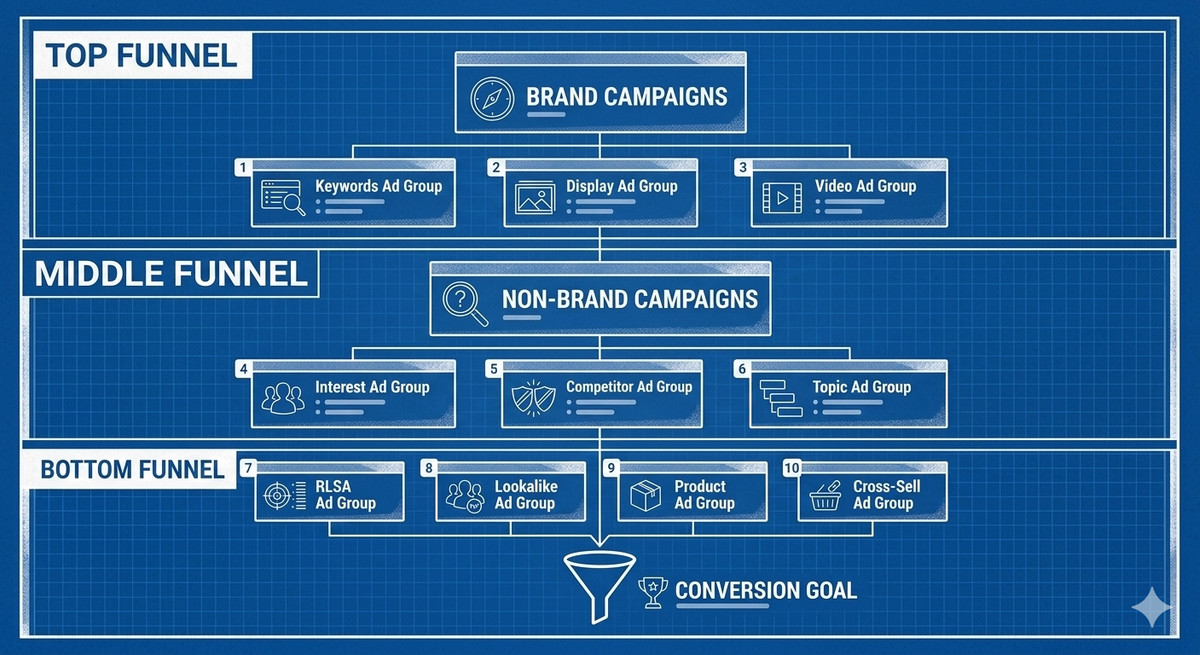
Every B2B SaaS purchase moves through stages. Awareness, consideration, decision. Your Google Ads account should mirror those stages with distinct campaigns at each level. This is funnel staging - the practice of mapping campaign structure to buyer intent rather than product features or keyword categories.
Why this matters for SaaS specifically:
- Sales cycles are long. 30 to 90 days is common. 6 to 12 months is not unusual for enterprise deals.
- Multiple stakeholders are involved. The person searching at the top of funnel may not be the person who signs the contract.
- Cost per click is high. B2B SaaS keywords regularly run $8 to $25 per click. Structural waste is expensive.
- Conversion events are layered. A whitepaper download, a demo request, and a closed deal are all conversions - but they are not worth the same thing.
Funnel staging lets you assign different budgets, bidding strategies, ads, and landing pages to each intent level. Top-of-funnel campaigns can run with broader targeting and lower bids. Bottom-of-funnel campaigns can bid aggressively on high-intent terms where conversion rates justify the cost.
Layer 1: Top of Funnel - Problem Aware
These prospects know they have a problem. They do not know your product exists. They are searching for information, not vendors.
Example queries:
- "how to reduce customer churn SaaS"
- "best practices for sales pipeline management"
- "what is marketing attribution"
Campaign structure:
Create one campaign per major problem theme your product solves. If your platform handles both churn reduction and revenue forecasting, those are two separate campaigns. Each campaign should contain tightly themed ad groups - more on that structure below.
Bidding: Use Maximize Clicks or a conservative Target CPA. These clicks are cheap relative to bottom-of-funnel terms but convert at lower rates. You are paying for awareness, not demos.
Ads: Educational, not promotional. Lead with the problem, not your product name. Offer content - guides, reports, frameworks. Nobody searching "how to fix churn" wants to see "Book a Demo with AcmeSaaS."
Landing pages: Gated content. Whitepaper downloads, webinar registrations, assessment tools. Capture the email. Enter the nurture sequence.
Match type: Broad match is acceptable here if paired with strong negative keyword lists. You want to discover how your audience actually describes their problems. But monitor search term reports weekly to catch irrelevant queries early.
Layer 2: Middle of Funnel - Solution Aware
These prospects know solutions exist. They are comparing categories, evaluating approaches, and building shortlists. They are not ready to buy but they are actively researching.
Example queries:
- "CRM software for B2B startups"
- "best revenue operations platforms 2026"
- "marketing attribution tools comparison"
Campaign structure:
One campaign per product category or solution area. Within each campaign, build ad groups around specific solution themes. If you sell a CRM, separate ad groups might target "CRM for startups," "CRM for sales teams," and "CRM with pipeline reporting."
Bidding: Target CPA based on your cost-per-qualified-lead target. These clicks are more expensive but significantly more likely to convert to a meaningful action.
Ads: Position your product as a solution to the category problem. Use social proof - customer counts, G2 ratings, industry recognition. Highlight differentiators. This audience is comparing. Give them reasons to pick you.
Landing pages: Product overview pages, comparison pages, or case study landing pages. The prospect wants evidence. Show them results from companies similar to theirs.
Match type: Phrase match and exact match. You need tighter control here because cost per click is higher and the wrong traffic burns budget fast.
Layer 3: Bottom of Funnel - Decision Ready
These prospects are ready to act. They are searching for your product by name, comparing your pricing, or looking for direct purchase signals.
Example queries:
- "AcmeSaaS pricing"
- "AcmeSaaS vs CompetitorX"
- "AcmeSaaS demo"
- "buy revenue operations software"
Campaign structure:
Separate campaigns for branded terms and high-intent non-branded terms. Your branded campaign protects your name from competitor conquesting. Your high-intent non-branded campaign captures prospects who are ready to buy but have not settled on a vendor.
Bidding: Target ROAS if you track deal values back to Google Ads. Target CPA if you track demo requests or trial signups as your primary conversion. Bid aggressively. These are your most valuable clicks.
Ads: Direct and action-oriented. "Start Your Free Trial." "See Pricing." "Book a Demo in 30 Seconds." Remove friction from every word. Use all available ad extensions - sitelinks to pricing, callouts for free trial length, structured snippets for features.
Landing pages: Demo request forms, pricing pages, free trial signup. Minimal distractions. One CTA. Every element on the page should push toward conversion.
Match type: Exact match for non-branded high-intent terms. Broad match on branded terms is fine since you want to catch every variation of your product name.
SKAGs vs STAGs: Which Ad Group Structure Works for SaaS
The ad group question has been debated for years. Here is where things stand in 2026.
SKAGs (Single Keyword Ad Groups) assign one keyword per ad group. Every ad is tailored to that exact keyword. Relevance is maximized. Quality Scores tend to be high.
The problem with SKAGs for SaaS:
- They create massive account bloat. A 200-keyword account becomes 200 ad groups. Management overhead explodes.
- Google's Smart Bidding algorithms perform better with aggregated data. Fragmenting conversions across hundreds of ad groups starves each one of the data needed for optimization.
- Responsive search ads have reduced the relevance advantage. Google now mixes and matches headlines dynamically, reducing the need for hyper-specific ad copy per keyword.
STAGs (Single Theme Ad Groups) group 5 to 15 tightly related keywords into one ad group. The theme is narrow enough that a single set of ads remains relevant to every keyword in the group.
Why STAGs win for B2B SaaS:
- Conversion data consolidates at the ad group level, giving Smart Bidding more signal to work with.
- Management is sustainable. An account with 30 to 50 STAGs is maintainable. An account with 300 SKAGs is a part-time job.
- You can still write highly relevant ads. If every keyword in the group shares a common theme, your responsive search ad headlines can cover the full range naturally.
The practical rule: If you can write one set of ads that feels relevant to every keyword in the group, it is a valid STAG. If you need fundamentally different messaging for two keywords, they belong in separate ad groups.
Match Type Strategy for SaaS
Match types control how broadly Google interprets your keywords. In B2B SaaS, where clicks are expensive, match type decisions directly impact budget efficiency.
Exact match triggers your ad only when the search closely matches your keyword. It offers maximum control and is ideal for high-cost, high-intent terms where you cannot afford irrelevant clicks.
Phrase match triggers when the search includes your keyword's meaning in a broader context. It provides moderate reach with reasonable control. Good for mid-funnel terms where you want some query discovery without full exposure.
Broad match triggers on any search Google considers related to your keyword. It casts the widest net. In B2B SaaS, broad match is risky without guardrails - but it is also where you discover search terms you never would have thought to target.
The SaaS match type framework:
| Funnel Stage | Recommended Match Types | Rationale |
|---|---|---|
| Top of funnel | Broad match + heavy negatives | Discovery is valuable. Waste is acceptable if controlled. |
| Middle of funnel | Phrase match + exact match | Balance reach with cost control. CPCs are higher. |
| Bottom of funnel | Exact match (non-branded), broad match (branded) | Maximum precision on expensive terms. Catch all brand variations. |
The key to making broad match work at any funnel stage is aggressive negative keyword management. Without it, broad match in a SaaS account will match to job searches, academic queries, free tool seekers, and competitor employee searches - none of which convert.
Negative Keyword Lists: The Structural Backbone
Negative keyword lists are not a cleanup task. They are a structural component of your account architecture. In B2B SaaS, they do as much work as your targeting keywords.
Build three standard lists and apply them across your account:
List 1: Universal negatives. Terms that are never relevant regardless of campaign. Examples: "free," "jobs," "salary," "internship," "certification," "tutorial," "reddit," "github," "open source," "download free." Apply this list to every campaign in the account.
List 2: Funnel stage negatives. Terms that belong in one funnel stage but not another. Your bottom-of-funnel campaign should negative match informational terms like "what is" and "how to." Your top-of-funnel campaign should negative match high-intent terms like "pricing" and "demo" to avoid stealing clicks from your bottom-of-funnel campaign where those terms are better served.
List 3: Competitor negatives (selective). If you are not running competitor conquest campaigns, add competitor brand names as negatives to prevent your broad match keywords from triggering on competitor searches. If you are running conquest campaigns, only apply these negatives to your non-conquest campaigns.
Maintenance cadence: Review search term reports weekly for the first month of any new campaign. Move to biweekly once the account stabilizes. Add negatives proactively, not reactively. Every irrelevant click you prevent is budget redirected toward a click that converts.
Naming Conventions and Account Hygiene
This section is not glamorous. It is essential. A B2B SaaS Google Ads account that scales beyond 10 campaigns without a naming convention becomes unmanageable within months.
Use a consistent format:
[Funnel Stage] | [Product/Theme] | [Match Type] | [Geo]
Examples:
TOF | Churn Reduction | Broad | USMOF | CRM Comparison | Phrase+Exact | USBOF | Brand | Broad | GlobalBOF | High Intent | Exact | US
This format lets you filter campaigns by funnel stage instantly, compare performance across themes, and onboard new team members without a 30-minute walkthrough.
Additional hygiene rules:
- Label campaigns with their primary conversion action. Not every campaign optimizes toward the same goal.
- Document your negative keyword lists in a shared sheet. Lists applied inside Google Ads are invisible to anyone not logged into the account.
- Archive paused campaigns quarterly. Do not delete them - they contain historical data. But move them out of your active view.
Scaling the Structure
Once this blueprint is running, scaling is straightforward because the architecture is modular.
Adding a new product line: Duplicate the three-layer funnel structure. Create TOF, MOF, and BOF campaigns for the new product. Apply your universal negative keyword list. Build product-specific negatives to prevent overlap with existing campaigns.
Expanding to new geos: Duplicate existing campaigns with geo-specific targeting. Adjust bids for local CPC benchmarks. Translate ads if entering non-English markets. Keep the naming convention consistent.
Increasing budget: Allocate incrementally from the bottom up. Fund BOF campaigns fully first - these have the highest conversion rates and most direct revenue impact. Then expand MOF. Fund TOF last, only after your lower-funnel campaigns are capturing available demand efficiently.
Testing new channels within Google: Performance Max, YouTube, Discovery - each gets its own campaign outside the core search structure. Do not blend search and non-search campaigns. Their performance profiles are too different to share budgets or bidding strategies.
Frequently Asked Questions
What is the best Google Ads account structure for B2B SaaS?
The most effective structure organizes campaigns by funnel stage - top, middle, and bottom - rather than by keyword list or product feature. Each stage gets its own campaigns, bidding strategies, ads, and landing pages aligned to buyer intent. This lets you allocate budget precisely and measure performance at each stage of the journey independently.
Are SKAGs still worth using in 2026?
For most B2B SaaS accounts, no. SKAGs create unsustainable management overhead and fragment conversion data across too many ad groups. Google's Smart Bidding algorithms perform better with consolidated data. STAGs - single theme ad groups with 5 to 15 tightly related keywords - offer nearly the same relevance benefits with far better scalability and algorithmic performance.
How many campaigns should a SaaS Google Ads account have?
There is no universal number, but a well-structured account for a single-product SaaS company typically runs 6 to 12 campaigns. Three funnel stages times two to four theme variations, plus a branded campaign. Avoid creating campaigns for the sake of granularity. Every campaign needs enough budget and conversion volume to exit the learning phase and optimize effectively.
Should I use broad match for B2B SaaS keywords?
Broad match has a role at the top of funnel where discovery is valuable and CPCs are lower. But it requires aggressive negative keyword lists to prevent waste. At the middle and bottom of funnel, phrase match and exact match provide the cost control that expensive SaaS keywords demand. Never run broad match without monitoring search term reports weekly.
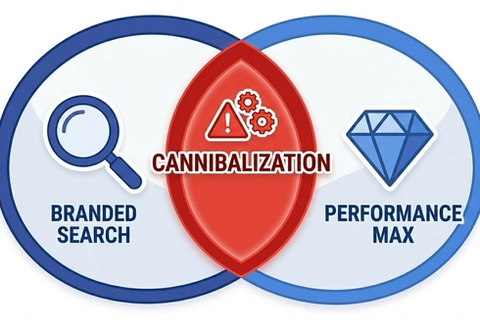
How do I prevent my campaigns from competing against each other?
Use funnel stage negative keywords. Your bottom-of-funnel campaign should negative match informational queries like "what is" and "how to." Your top-of-funnel campaign should negative match high-intent terms like "pricing" and "demo." This forces each query into the campaign best equipped to handle it and prevents internal auction competition.
How much budget should I allocate to each funnel stage?
Start by funding bottom of funnel fully. These campaigns have the highest conversion rates and most direct revenue attribution. A common starting split is 50 to 60% bottom of funnel, 25 to 30% middle of funnel, and 10 to 20% top of funnel. Adjust based on your actual conversion data after 30 to 60 days. If bottom-of-funnel campaigns are not budget constrained, shift more toward middle of funnel to feed the pipeline.
What conversion actions should I track for SaaS?
Track layered conversion events - not just one. Common SaaS conversion actions include whitepaper downloads (top of funnel), demo requests and free trial signups (bottom of funnel), and qualified pipeline or closed revenue (offline import). Assign different values to each. Use Google Ads conversion value rules to weight high-value actions appropriately in your Smart Bidding strategies.
How often should I review and update my account structure?
Review search term reports and negative keyword lists weekly for the first month of any new campaign, then biweekly. Audit overall account structure quarterly - check for campaign overlap, stale ad groups, and budget allocation alignment. Do a full structural review every six months to ensure the architecture still matches your product offerings and go-to-market strategy.