Introduction
Performance Max looks incredible on paper. You launch a PMax campaign, give Google your assets, set a ROAS target, and watch the conversions roll in. The numbers are strong. Your ROAS is higher than any other campaign in the account. Leadership is thrilled.
Then someone asks a simple question: where are those conversions actually coming from?
You dig into the data. You discover that a significant chunk of your PMax conversions are from people who searched your brand name. People who were already going to find you. People your branded search campaign would have captured at a fraction of the cost.
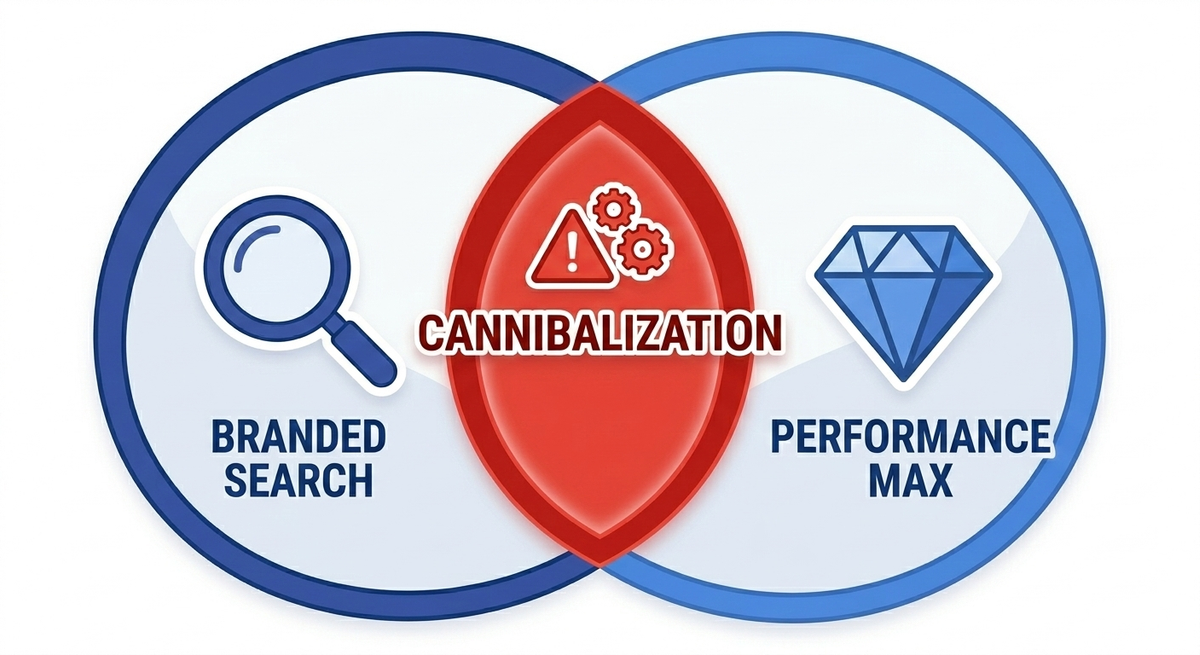
This is Performance Max branded search cannibalization - and it is one of the most common and most expensive problems in Google Ads accounts running PMax campaigns today. Google does not make it easy to see. The reporting is deliberately opaque. But once you understand the mechanics, the evidence is impossible to ignore.
This guide explains exactly how it happens, how to prove it is happening in your account, and how to stop it without killing legitimate PMax performance.
Understanding the right bidding model is the first step - compare your options in choosing the right bidding strategy.
How Performance Max Actually Works
Before diagnosing the problem, you need to understand what makes PMax different from every other campaign type.
Traditional Google Ads campaigns operate on a single network. A search campaign runs on the search network. A display campaign runs on the display network. A YouTube campaign runs on YouTube. You control which network your ads appear on and can see performance by network clearly.
PMax campaigns run across every Google network simultaneously - search, display, YouTube, Discover, Gmail, and Maps. Google's algorithm decides which network to serve your ad on for each individual auction. You provide creative assets and a conversion goal. Google handles everything else.
This cross-network flexibility is PMax's selling point. It is also the source of the cannibalization problem. Because PMax can serve ads on the search network, it competes directly with your existing search campaigns - including your branded search campaign. And Google's own internal auction mechanics give PMax a structural advantage.
The Cannibalization Mechanism
Here is what happens step by step.
A customer who already knows your brand types your company name into Google. Under normal circumstances, your branded search campaign would win this auction. Branded keywords typically have Quality Scores of 8 to 10. CPCs are low - often $0.50 to $2.00. Conversion rates are high because the searcher already intended to visit your site.
But PMax is also eligible for this auction. Google's system evaluates both campaigns and decides which one to serve. In theory, Google prioritizes exact match keywords in standard search campaigns over PMax. In practice, this prioritization has significant gaps.
PMax wins branded auctions when:
- Your branded search campaign does not have the exact keyword variation the user typed. "AcmeSaaS login," "AcmeSaaS reviews 2026," "AcmeSaaS vs competitor" - if these are not exact match keywords in your branded campaign, PMax can claim them.
- Your branded campaign is limited by budget, has a restrictive bidding target, or has ad scheduling gaps. Any period where your branded campaign is not fully active, PMax fills the void.
- Google's algorithm determines that PMax will produce a higher conversion value. Since PMax optimizes for value across all networks, it may prioritize capturing a branded click over letting your cheaper branded campaign handle it.
The result: PMax absorbs branded traffic that your branded search campaign would have captured anyway. The conversions show up in PMax reporting. PMax ROAS looks outstanding. Your branded search campaign's volume drops. And your total account performance stays flat or even declines - because you are now paying PMax prices for traffic that used to cost a third as much.
Why the ROAS Numbers Lie
This is where the damage compounds.
PMax campaigns report blended ROAS across all networks. Branded search traffic converts at extremely high rates with minimal cost. When PMax absorbs this traffic, those cheap, high-converting branded clicks get mixed into PMax's overall numbers. The reported ROAS inflates dramatically.
Consider a simplified example. Your PMax campaign generates 100 conversions:
- 40 conversions come from branded search queries. These would have cost $1.50 per click in your branded campaign. In PMax, they cost $3.00 per click because PMax bidding is more aggressive.
- 60 conversions come from display network, YouTube, and Discover. These are incremental - they would not have happened without PMax.
PMax reports all 100 conversions with a blended ROAS of 600%. Leadership sees 600% and increases the PMax budget. But the true incremental ROAS - based only on the 60 conversions PMax actually generated - is closer to 350%. And the 40 branded conversions now cost twice what they used to.
ROAS inflation from branded cannibalization creates a feedback loop. Inflated numbers justify higher budgets. Higher budgets give PMax more auction power. More auction power means more branded traffic absorbed. The reported numbers keep looking good while actual efficiency erodes.
This is not a theoretical risk. It is the default behavior in accounts where PMax and branded search campaigns run side by side without proper isolation.
How to Diagnose Cannibalization in Your Account
Proving cannibalization requires comparing data across campaigns and time periods. Google does not surface this in a single report. You need to build the picture yourself.
Step 1: Check PMax search term insights.
Navigate to your PMax campaign. Open the Insights tab. Look at the "Search term insights" section. Google groups search terms into themes. Look for a theme that matches your brand name or close variations. If branded terms appear as a significant theme, PMax is serving ads on your branded queries.
Note: Google does not show individual search terms for PMax. You only see themed categories. This deliberate opacity is part of the problem. But branded themes are usually obvious - they will contain your company name or product name.
Step 2: Compare branded campaign volume before and after PMax launch.
Pull your branded search campaign's conversion volume for the 60 days before you launched PMax and the 60 days after. If branded conversions dropped by 20% or more without any other changes - no seasonality shifts, no budget cuts, no landing page changes - PMax is absorbing that volume.
Step 3: Run a PMax pause test.
This is the most conclusive diagnostic. Pause your PMax campaign for 7 to 14 days. Monitor your branded search campaign during this window. If branded search volume and conversions immediately jump back to pre-PMax levels, you have confirmed cannibalization. The traffic PMax was claiming was never incremental - it was redirected branded traffic.
Document the numbers carefully. You will need this evidence to justify the structural changes required to fix the problem.
Step 4: Check auction insights on your branded campaign.
Open auction insights for your branded search campaign. If your impression share on branded terms dropped after PMax launched, and no new competitors entered the auction, PMax is the most likely cause. Your own PMax campaign is competing against your own branded campaign in the same auction.
We've seen PMax misuse firsthand — read a real audit example of PMax abuse
Fix 1: Apply Brand Exclusions to PMax
Google now allows brand exclusions on PMax campaigns. This is the most direct fix available.
Navigate to your PMax campaign settings. Under "Brand exclusions," add your own brand name and all common variations - misspellings, abbreviations, product names, and former brand names if applicable.
Once applied, PMax will no longer serve ads on search queries that contain your excluded brand terms. Those queries route back to your branded search campaign where CPCs are lower and control is higher.
Important caveats:
- Brand exclusions only apply to the search network component of PMax. PMax can still serve display, YouTube, and Discover ads to audiences who have previously searched your brand. This is acceptable - the expensive cannibalization happens on search.
- Brand exclusions do not cover every possible branded query variation. Google matches based on its own brand recognition, not exact keyword matching. Monitor your PMax search term insights after applying exclusions to verify branded themes disappear.
- You must submit a brand exclusion request through Google's brand list tool. Approval is usually fast but not instant. Plan for a 2 to 5 day activation window.
Brand exclusions should be the first fix you implement. They eliminate the majority of branded search cannibalization with minimal impact on legitimate PMax performance.
Fix 2: Fortify Your Branded Search Campaign
Brand exclusions block PMax from branded queries. But you also need to ensure your branded search campaign captures every branded query comprehensively. Any gap in your branded campaign is a gap PMax can exploit - even with exclusions applied.
Expand your branded keyword list. Add exact match versions of every branded variation you can identify:
- Brand name + product names
- Brand name + "pricing," "demo," "login," "reviews," "alternatives"
- Brand name + competitor names (for "vs" queries)
- Common misspellings and abbreviations
- Brand name + current year
Remove budget constraints. Your branded campaign should never be limited by budget. Branded CPCs are your cheapest clicks. If budget limitations cause your branded campaign to exit auctions during peak hours, PMax or competitors fill that gap. Set your branded budget high enough to capture 95%+ impression share.
Use exact match aggressively. Google's auction priority rules favor exact match keywords in standard search campaigns over PMax. The more exact match branded keywords you have, the stronger your structural defense against cannibalization.
Fix 3: Restructure PMax Asset Groups
If brand exclusions are not fully solving the problem - or if you are in an industry where Google's brand matching is unreliable - restructure your PMax campaign to reduce branded overlap.
Remove branded language from PMax assets. Check every headline, description, and image in your PMax asset groups. If your brand name appears in PMax creative assets, Google's algorithm interprets this as a signal that your PMax campaign is relevant to branded queries. Remove your brand name from PMax assets entirely. Let your branded search campaign own all branded messaging.
Tighten your audience signals. PMax uses audience signals as starting points for targeting. If your audience signals include customer match lists, website visitors, or brand-aware in-market segments, PMax may over-index on branded traffic because those audiences are the easiest to convert. Shift PMax audience signals toward prospecting audiences - lookalikes, broader in-market segments, and interest-based targeting. Push PMax toward finding new customers, not converting existing ones.
Separate asset groups by intent. If you run a single asset group with mixed messaging, PMax will gravitate toward the easiest conversions - which are branded. Create distinct asset groups with messaging aimed purely at non-branded discovery and consideration. This guides the algorithm toward incremental traffic.
Fix 4: Measure Incrementality, Not Just ROAS
Even after applying fixes, you need an ongoing measurement framework that separates genuine PMax value from ROAS inflation.
Track incremental conversions. Compare total account conversions with PMax active versus paused. If pausing PMax causes total conversions to drop significantly, PMax is generating genuine incremental value. If total conversions barely change, PMax was primarily redistributing existing demand.
Segment PMax by network. While Google does not break PMax reporting down by network in the standard interface, you can approximate it. Check your PMax placement reports under "Where ads showed." Look at the ratio of search placements versus display network, YouTube, and Discover placements. A PMax campaign generating 70% of its conversions from search placements is almost certainly cannibalizing your search campaigns. A PMax campaign generating most conversions from display and YouTube is more likely driving incremental awareness.
Calculate true ROAS. Subtract estimated branded conversions from PMax totals. Use your branded search campaign's historical conversion rate and your PMax search term insights to estimate how many PMax conversions came from branded queries. Recalculate ROAS on the remaining non-branded conversions. This is your true incremental ROAS - the number your budget decisions should be based on.
The Real Cost of Ignoring This
The financial impact of unchecked PMax branded cannibalization is not subtle. Here is what it looks like in a real account.
A SaaS company spends $50,000 per month on Google Ads. Their PMax campaign reports a 500% ROAS. Their branded search campaign's volume has declined 35% since PMax launched.
After diagnosis, they discover that approximately 30% of PMax conversions are from branded queries. Those conversions cost $8 per click in PMax versus $2 per click in branded search. That is $6 per click in unnecessary premium across roughly 2,000 branded clicks per month - $12,000 per month in wasted spend. $144,000 per year.
The PMax campaign still looks profitable because the blended ROAS hides the waste. But $144,000 redirected from PMax branded cannibalization to genuine prospecting campaigns would generate net-new pipeline. Instead, it subsidizes conversions that were already free.
This is why branded search cannibalization is not just a reporting issue. It is a revenue issue.
When PMax Is Actually Worth Running
This guide is not an argument against Performance Max. PMax delivers real value when it operates in its intended role - reaching new audiences across Google's full network of properties.
PMax works well when:
- Brand exclusions are active and verified
- The campaign is measured on incremental conversions, not blended ROAS
- Asset groups are structured around prospecting, not retargeting
- The account has a strong branded search campaign that captures 95%+ branded impression share
- Search term insights are monitored monthly for branded theme leakage
PMax is a powerful prospecting tool. It is a terrible branded search tool. The fix is not to kill PMax. It is to put it back in its lane.
Frequently Asked Questions
What is Performance Max branded search cannibalization?
It is when your PMax campaign serves ads on search queries containing your brand name - queries that your branded search campaign would have captured at a lower cost. PMax claims credit for these conversions, inflating its reported ROAS while adding no incremental value. Your total account performance stays flat, but you pay more for the same branded traffic.
How do I know if PMax is cannibalizing my branded search?
Check three things. First, look at PMax search term insights for branded themes. Second, compare your branded search campaign's conversion volume before and after PMax launched. Third, run a 7 to 14 day PMax pause test and see if branded search volume recovers. If branded themes appear in PMax, branded campaign volume dropped after PMax launched, and volume returns when PMax is paused, cannibalization is confirmed.
What are brand exclusions in Performance Max?
Brand exclusions are a PMax setting that prevents your campaign from serving ads on search queries containing specified brand names. You can exclude your own brand to keep branded traffic in your dedicated branded search campaign. Brand exclusions only affect the search network component of PMax - display, YouTube, and Discover placements are unaffected.
Do brand exclusions completely solve the problem?
They eliminate the majority of search-based branded cannibalization. However, they are not perfect. Google's brand matching may miss some variations, and PMax can still serve non-search ads to brand-aware audiences. Brand exclusions should be your first fix, but pair them with a fortified branded search campaign and ongoing monitoring of PMax search term insights.
Why does Google allow PMax to compete with branded search campaigns?
PMax is designed to optimize across all networks and all queries for maximum conversion value. Google's system does not inherently distinguish between branded and non-branded demand - it chases the highest-value conversions regardless of source. Branded queries are the easiest conversions available, so PMax gravitates toward them naturally. Brand exclusions were introduced in response to widespread advertiser complaints about this behavior.
How does PMax inflate ROAS?
PMax reports blended ROAS across all networks and all query types. When high-converting, low-cost branded traffic mixes with genuine prospecting traffic, the blended number skews upward. A campaign that generates 500% ROAS may only deliver 300% ROAS on truly incremental non-branded conversions. The remaining lift comes from branded conversions that would have happened anyway through your cheaper branded search campaign.
Should I pause PMax entirely if I find cannibalization?
No. Pausing PMax removes any genuine incremental value it provides across display, YouTube, and Discover. Instead, apply brand exclusions, remove branded language from PMax assets, and restructure audience signals toward prospecting. Measure incremental performance after these changes. Only pause PMax if it delivers no measurable lift beyond what your search campaigns capture independently.
Can PMax cannibalize non-branded search campaigns too?
Yes. PMax can serve ads on any search query, not just branded ones. If your non-branded search campaigns target keywords that PMax is also matching to, the same cannibalization dynamic applies. The fix is the same principle - ensure your standard search campaigns have strong exact match coverage on your most valuable non-branded terms, and monitor PMax search term insights for non-branded theme overlap.
How often should I check for PMax cannibalization?
Review PMax search term insights and branded campaign impression share monthly. Run a formal PMax pause test quarterly if you suspect ongoing leakage. Any time you launch new PMax asset groups, add new audience signals, or change PMax bidding targets, monitor branded campaign volume for the following two weeks to catch new cannibalization early.