Introduction
Most Google Ads optimizations happen inside the ad platform. Keyword adjustments. Bid changes. Ad copy tests. The landing page sits outside that workflow, so it gets ignored. This is a mistake that costs real money every single day.
Landing page experience is one of three factors that determine your Quality Score - alongside ad relevance and expected click-through rate. A poor landing page drags your Quality Score down, which forces you to pay more per click to maintain the same ad position. A strong landing page pushes your score up, earning you Google's built-in discount on every auction you enter.
Landing page experience directly impacts ad costs — learn how landing pages affect Quality Score.
The math is direct. An advertiser with a Quality Score of 8 pays roughly 30 to 50% less per click than an advertiser with a Quality Score of 5 - for the exact same keyword in the exact same auction. The difference is often the landing page.
See how landing page optimization drove 172% customer growth for Guidde.
This guide covers five specific optimizations that improve landing page experience as Google measures it, increase your on-page conversion rate, and compound into significantly lower CPCs over time. None of them require a full site redesign. All of them can be implemented within a week.
For online stores, we offer specialized ecommerce landing page services.
How Google Evaluates Your Landing Page
Before making changes, understand what Google actually measures.
Google's landing page experience rating is based on three broad criteria:
Relevance. Does the page content match what the ad promised? If your ad says "CRM for Small Law Firms" and the landing page is a generic homepage, Google registers a relevance gap. The rating drops.
Usefulness. Does the page provide substantive content that helps the visitor accomplish their goal? Thin pages with a form and nothing else score poorly. Pages that answer questions, provide context, and guide the visitor score well.
Technical performance. Does the page load quickly, display correctly on mobile, and provide a stable visual experience? Google measures this through Core Web Vitals - three specific metrics that quantify page speed, responsiveness, and visual stability.
Your landing page experience rating feeds directly into your Quality Score. A "below average" rating pulls your score down by 1 to 3 points. An "above average" rating lifts it. The CPC impact is immediate and ongoing - every click costs more or less depending on this rating.
The five tweaks below target all three criteria.
Tweak 1: Fix Your Core Web Vitals
Core Web Vitals are not optional performance suggestions. They are the technical foundation of Google's landing page experience evaluation. If your vitals are failing, none of the other optimizations in this guide will reach their full impact.
Three metrics matter:
Largest Contentful Paint (LCP) measures how long it takes for the largest visible element on the page to render. This is usually a hero image, a headline block, or a video thumbnail. Google's threshold: under 2.5 seconds. Anything above 4 seconds is rated poor.
Cumulative Layout Shift (CLS) measures how much the page layout shifts while loading. If buttons jump, text reflows, or images push content down as they load, CLS scores high - and that is bad. Google's threshold: under 0.1. Anything above 0.25 is rated poor.
Interaction to Next Paint (INP) measures how quickly the page responds when a user interacts with it - clicking a button, tapping a field, expanding a dropdown. Google's threshold: under 200 milliseconds. Anything above 500 milliseconds is rated poor.
How to diagnose:
Run your landing page URLs through Google PageSpeed Insights. It returns your Core Web Vitals scores with specific recommendations for each failing metric. Run both mobile and desktop tests - Google primarily evaluates mobile performance for ad quality purposes.
Common fixes that produce the largest improvements:
- Compress and lazy-load images. Oversized hero images are the number one cause of slow LCP. Convert images to WebP format. Set explicit width and height attributes to prevent layout shift. Lazy-load any image below the fold.
- Eliminate render-blocking resources. Move non-critical CSS and JavaScript to asynchronous loading. Inline critical CSS directly in the page head. Defer third-party scripts - analytics, chat widgets, tracking pixels - until after the page renders.
- Reserve space for dynamic elements. Ads, embedded forms, and dynamically loaded content cause layout shift when they pop in after initial render. Set explicit dimensions for every container that loads content asynchronously.
- Minimize main thread work. Heavy JavaScript execution blocks INP. Audit your page scripts for unnecessary processing. Remove unused libraries. Break long tasks into smaller chunks.
Target outcome: All three Core Web Vitals passing on mobile. This alone can move your landing page experience rating from "below average" to "average" - which translates to a 1 to 2 point Quality Score improvement and a measurable CPC reduction.
Tweak 2: Nail Message Match Between Ad and Page
Message match is the single most overlooked conversion factor in Google Ads. It is also the factor Google weighs most heavily in its relevance assessment.
The principle is simple: the headline on your landing page must directly mirror the promise in your ad. Not loosely. Not thematically. Directly.
Bad message match:
- Ad headline: "Project Management Software for Remote Teams"
- Landing page headline: "Welcome to AcmeSaaS - The Modern Work Platform"
The visitor clicked because they wanted project management for remote teams. They landed on a generic brand page. Cognitive dissonance kicks in. They question whether they are in the right place. Bounce rate spikes. Google registers the poor engagement and downgrades your landing page experience.
Good message match:
- Ad headline: "Project Management Software for Remote Teams"
- Landing page headline: "Project Management Built for Remote Teams"
The visitor sees their exact need reflected back. Confidence is immediate. They scroll. They engage. They convert.
How to implement message match at scale:
If you run many ad groups with different messaging themes, you need landing page variations to match. This does not mean building dozens of unique pages from scratch.
- Use dynamic text replacement. Tools like Unbounce, Instapage, and custom JavaScript solutions let you swap the headline and subheadline based on URL parameters. Your ad passes the keyword or theme through the URL. The landing page renders the matching headline automatically. One page template serves dozens of ad groups with perfect message match.
- Create modular page sections. Build a landing page template where the hero section - headline, subheadline, and hero image - is swappable. Keep the body content, testimonials, and form consistent. This gives you message match at the top of the page where it matters most without multiplying your maintenance burden.
- Match beyond the headline. The subheadline should reinforce the ad's secondary message. If your ad mentions "free trial," the subheadline should reference the free trial. If your ad mentions "no credit card required," that phrase should appear on the page. Every promise in the ad must have a visible confirmation on the page.
How to audit existing message match:
Open a spreadsheet. List every active ad group. Next to each, paste the primary ad headline and the landing page headline. Flag any pair where the landing page headline does not directly reflect the ad's core message. These mismatches are your highest-priority fixes.
Tweak 3: Move Your CTA Above the Fold
Above the fold means visible without scrolling on the device the visitor is using. For Google Ads traffic - which is increasingly mobile - this means visible within the first 600 to 700 pixels of vertical screen space.
If your primary call to action requires scrolling to find, you are losing conversions from visitors who never scroll. Heatmapping data consistently shows that 40 to 60% of landing page visitors never scroll past the first viewport. If your CTA lives below that threshold, it is invisible to half your traffic.
What an effective above-the-fold CTA includes:
- A single, clear action. "Start Your Free Trial." "Get a Quote." "Book a Demo." One button. One ask. Do not present multiple CTAs competing for attention.
- Contrasting visual weight. The button must be the most visually prominent element in the viewport. Use a color that contrasts with your page background. Make it large enough to tap easily on mobile - minimum 44x44 pixels.
- Supporting microcopy. Directly below or beside the button, add a single line that reduces friction. "No credit card required." "Takes 30 seconds." "Free for 14 days." This microcopy addresses the visitor's hesitation before they consciously articulate it.
What to remove from above the fold:
- Navigation menus. Landing pages should not have site navigation. Every link that is not your CTA is an exit opportunity. Remove the header nav entirely or collapse it behind a hamburger menu.
- Multiple value propositions. Above the fold communicates one thing: what you offer and how to get it. Save feature lists, comparisons, and detailed explanations for below the fold.
- Autoplay videos that push the CTA down. If you use a hero video, keep it background-only or place it beside the CTA rather than above it.
Mobile-specific considerations:
Test your landing page on an actual phone, not just a responsive preview in your browser. Form fields that look fine on desktop often stack awkwardly on mobile, pushing the submit button below the fold. If your CTA is a form, reduce it to 2 to 3 fields maximum for mobile visitors. Name. Email. Submit. Collect additional information after the initial conversion.
Tweak 4: Add Trust Signals That Reduce Friction
A visitor who clicks your Google ad is not yet a customer. They are a skeptic with a problem. They clicked because your ad made a promise. Now they need proof that you can deliver.
Trust signals provide that proof. They reduce the psychological friction between "this looks interesting" and "I will submit my information." On landing pages receiving paid traffic, trust signals directly impact conversion rate - which in turn influences Google's assessment of page usefulness.
High-impact trust signals, ranked by effectiveness:
1. Customer logos. If recognizable companies use your product, show their logos. A strip of 4 to 6 logos near the top of the page instantly communicates credibility. This works for B2B and B2C. A visitor who sees a brand they respect using your product transfers that trust to you.
2. Specific testimonials with attribution. Generic quotes are weak. "Great product!" with no name attached does nothing. A testimonial that includes a full name, job title, company, and a specific result - "Reduced our onboarding time by 40% in the first month" - carries real weight. Place one strong testimonial above the fold or immediately below it.
3. Third-party validation. G2 badges, Capterra ratings, industry awards, security certifications (SOC 2, ISO 27001), and media mentions. These signals borrow authority from trusted external sources. Place them near your CTA where they can influence the conversion decision at the critical moment.
4. Social proof numbers. "Trusted by 12,000+ teams" or "4.8 stars from 2,300 reviews" - concrete numbers outperform vague claims. If you have strong numbers, display them prominently. If you do not, use the other trust signal types instead. Do not fabricate or inflate numbers.
5. Guarantee or risk reversal. "30-day money-back guarantee." "Cancel anytime." "Free trial - no credit card required." These reduce the perceived risk of taking action. The visitor thinks: even if this is not right for me, I lose nothing by trying. Place risk reversal language directly adjacent to your CTA button.
Where to place trust signals for maximum impact:
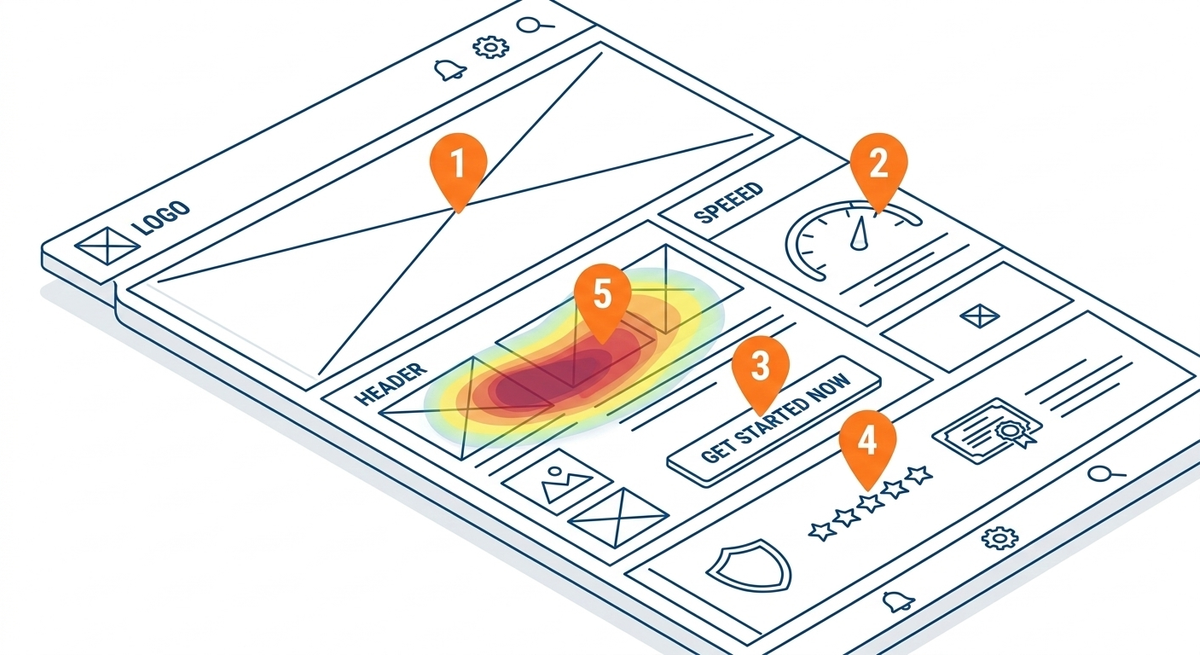
Heatmapping studies consistently show that visitors fixate on the area immediately surrounding the CTA before deciding whether to click. Place your strongest trust signal - one testimonial, one logo strip, or one guarantee statement - within the same visual block as your CTA. Do not bury trust signals at the bottom of the page where most visitors never reach.
Tweak 5: Use Heatmapping to Find What Is Actually Broken
The first four tweaks are based on universal best practices. They work in the majority of cases. But your landing page has its own unique friction points that no general checklist can identify. Heatmapping reveals them.
Heatmapping tools like Hotjar, Microsoft Clarity (free), and Lucky Orange record how visitors actually interact with your page. They track mouse movement, clicks, scroll depth, and tap behavior. The output is a visual overlay showing exactly where attention concentrates and where it drops off.
Three heatmap types and what they reveal:
Click maps show where visitors click. Look for clicks on non-clickable elements - this indicates visitors expect a link or button that does not exist. Look for clicks on secondary elements instead of your CTA - this means something else on the page is more compelling than your conversion action. Both patterns point to specific fixes.
Scroll maps show how far visitors scroll before leaving. If 60% of visitors drop off before reaching your CTA, the CTA needs to move up. If a specific section causes a sharp drop-off, that section is either confusing, irrelevant, or visually signals "end of page" to the visitor. Remove it, shorten it, or redesign it.
Session recordings show individual visitor journeys in real time. Watch 20 to 30 recordings from your Google Ads traffic specifically. Look for patterns: visitors who scroll up and down searching for information, visitors who start filling a form and abandon, visitors who rage-click on unresponsive elements. Each pattern is a conversion leak you can fix.
How to set up a landing page heatmapping audit:
- Install your heatmapping tool on your landing page. Microsoft Clarity is free and sufficient for most use cases.
- Let it collect data for 7 to 14 days or until you have at least 500 sessions from Google Ads traffic.
- Segment the data by traffic source. Only analyze sessions from your Google Ads campaigns. Organic visitors behave differently and will skew your findings.
- Generate click maps and scroll maps. Watch 20 to 30 session recordings.
- Document every friction point. Prioritize fixes by estimated impact - issues affecting the most visitors come first.
| Finding | What it means | Fix |
|---|---|---|
| Visitors click the hero image | They expect it to do something | Make it a clickable CTA or remove it |
| Sharp scroll drop at 40% | Content below the fold is not compelling enough | Move CTA and key trust signals higher |
| Form abandonment at field 3 | Too many fields or a confusing field | Reduce form to 2-3 fields |
| Rage clicks on pricing text | Visitors want more pricing detail | Add a pricing section or link to pricing page |
| Horizontal scroll on mobile | Page elements overflow the viewport | Fix responsive CSS, test on real devices |
Heatmapping is not a one-time exercise. Run an audit after every significant landing page change. What worked last quarter may not work this quarter as your traffic mix, audience, and competitive landscape shift.
How These Five Tweaks Compound
Each optimization works independently. Together, they create a compounding effect on both Quality Score and conversion rate.
Fast Core Web Vitals ensure Google's crawler rates your page technically sound. Message match confirms relevance between ad and page. An above-the-fold CTA captures visitors before they bounce. Trust signals overcome objections at the decision point. Heatmapping eliminates unique friction points that the other four tweaks cannot predict.
The Quality Score impact is direct. A page that loads fast, matches the ad, converts well, and keeps visitors engaged will earn an "above average" landing page experience rating. Combined with strong ad relevance and expected CTR, that pushes Quality Scores to 8, 9, or 10 - the range where Google applies its deepest CPC discounts.
The conversion rate impact is equally direct. Every percentage point improvement in conversion rate means more conversions from the same number of clicks. More conversions from the same spend means lower effective cost per acquisition. Lower CPA means higher ROAS. The budget does not change. The results do.
A landing page that scored a 3 on Quality Score and converted at 2% might score a 7 and convert at 5% after implementing all five tweaks. That is not a marginal improvement. That is a fundamentally different economic equation for every campaign pointing to that page.
Frequently Asked Questions
How does landing page experience affect my Google Ads CPC?
Landing page experience is one of three components of Quality Score, alongside ad relevance and expected click-through rate. A poor rating drags your Quality Score down, which forces you to bid higher to maintain your ad position. An above-average rating pushes your score up, earning automatic CPC discounts of 30 to 50% compared to advertisers with average or below-average ratings on the same keywords.
What are Core Web Vitals and why do they matter for Google Ads?
Core Web Vitals are three technical performance metrics Google uses to evaluate page experience: Largest Contentful Paint (loading speed), Cumulative Layout Shift (visual stability), and Interaction to Next Paint (responsiveness). Failing these metrics signals poor technical quality to Google, which lowers your landing page experience rating and increases your costs. Test your pages at PageSpeed Insights and fix any failing metrics as a first priority.
What is message match and how do I implement it?
Message match means your landing page headline directly mirrors the promise in your ad. If your ad says "CRM for Small Law Firms," your landing page headline should say the same thing - not a generic brand tagline. For accounts with many ad groups, use dynamic text replacement tools to swap headlines based on URL parameters, giving each ad group a perfectly matched landing page without building dozens of separate pages.
How many form fields should my landing page have?
For Google Ads traffic, fewer is almost always better. Every additional field increases form abandonment. Start with 2 to 3 fields - name, email, and one qualifying question if necessary. Collect additional information in a follow-up sequence after the initial conversion. On mobile, where most Google Ads clicks now land, long forms are especially damaging to conversion rates.
Do I need a dedicated landing page for every ad group?
Not necessarily, but you need message match for every ad group. A single landing page template with dynamic headline replacement can serve dozens of ad groups with perfect relevance. The body content, trust signals, and CTA can remain consistent. The hero section - headline, subheadline, and potentially hero image - should adapt to match each ad group's messaging.
How do I know if my landing page is the problem versus my ads?
Check your Quality Score component breakdown in Google Ads. Each keyword shows individual ratings for ad relevance, expected CTR, and landing page experience. If landing page experience shows "below average" while the other two components are average or above, the page is your bottleneck. Additionally, if your click-through rate is strong but your conversion rate is low, the issue is almost certainly post-click - meaning the landing page.
Which heatmapping tool should I use?
Microsoft Clarity is free, privacy-compliant, and sufficient for most landing page audits. It provides click maps, scroll maps, and session recordings with no traffic limits. Hotjar offers more advanced features like surveys and feedback widgets on paid plans. Lucky Orange adds real-time visitor monitoring. For most Google Ads landing page optimization, Clarity provides everything you need at no cost.
How long does it take for landing page changes to affect Quality Score?
Google recrawls landing pages periodically, not in real time. After making changes, expect 1 to 3 weeks before your Quality Score updates. During this window, monitor your landing page experience rating in the keyword details view. If the rating does not change after three weeks, Google may not have recrawled the page - use Google Search Console's URL inspection tool to request a recrawl manually.
Should I remove all navigation from my landing page?
For dedicated Google Ads landing pages, yes. Every navigation link is a potential exit that does not lead to your conversion goal. Remove the header menu, footer links, and any other navigation elements. The only clickable elements on the page should be your CTA, your trust signal links (which open in new tabs), and legally required links like privacy policy and terms. If you are sending Google Ads traffic to a regular website page rather than a dedicated landing page, consider building a dedicated variant without navigation.